
Ibn Tofail2.0.2 - App Store
You'll be able to see results in few seconds.
Publisher Description



Features:
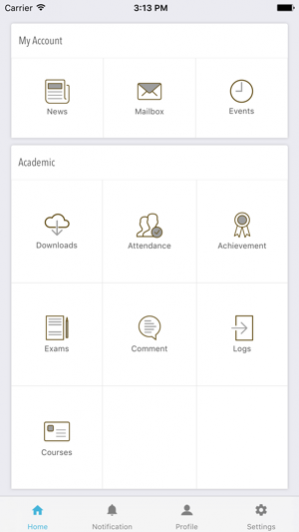
-News:Announcements, circulars, notice etc.. posted by the Administrator can be viewed
-Mailbox:The Mailbox module is an internal messaging application that allows the students to exchange the mails to the students/ parents/teachers/ administrator within the system. It consists of all the basic utilities: Compose message, inbox, sent mail and trash.
-Events:Events keep track of any trainings, or specified meetings that happen outside the online
environment. The admin can create an event for a meeting, or a presentation,exam, holiday
and enrol users onto that event.
-Downloads:The Download module permits to download files (application forms, study materials etc.) that
are uploaded by teachers or the administrator.
-Profile:The student profile option displays all registered details, including personal Details
-Logs:The log module displays logs entered for the particular student by a teacher or admin user.
These logs are also visible to the student’s parents. Date, category and name of the user who
posted the comment is also visible for each comment
Complaint:The Complaints module will give an option to the students to see the status of a complaint.
And More!
Oct 10, 2017 Version 2.0.2
Multi Language Support
More Modules Added
Improved UI Design
Improvements for Reliability and Speed
Bug fixes and Performance Improvements
Enhanced Push Notifications with Up-front Actions
Attached a Multi-info Dashboard
About Ibn Tofail
The company that develops Ibn Tofail is Laxial. The latest version released by its developer is 2.0.2.
To install Ibn Tofail on your iOS device, just click the green Continue To App button above to start the installation process. The app is listed on our website since 2017-10-10 and was downloaded 0 times. We have already checked if the download link is safe, however for your own protection we recommend that you scan the downloaded app with your antivirus. Your antivirus may detect the Ibn Tofail as malware if the download link is broken.
How to install Ibn Tofail on your iOS device:
- Click on the Continue To App button on our website. This will redirect you to the App Store.
- Once the Ibn Tofail is shown in the iTunes listing of your iOS device, you can start its download and installation. Tap on the GET button to the right of the app to start downloading it.
- If you are not logged-in the iOS appstore app, you'll be prompted for your your Apple ID and/or password.
- After Ibn Tofail is downloaded, you'll see an INSTALL button to the right. Tap on it to start the actual installation of the iOS app.
- Once installation is finished you can tap on the OPEN button to start it. Its icon will also be added to your device home screen.
Version History
version 2.0.2
posted on 2017-10-10
Oct 10, 2017 Version 2.0.2
Multi Language Support
More Modules Added
Improved UI Design
Improvements for Reliability and Speed
Bug fixes and Performance Improvements
Enhanced Push Notifications with Up-front Actions
Attached a Multi-info Dashboard
version 1.0
posted on 2016-12-23
version 2.0.2
posted on 1970-01-01
10. Okt. 2017 Version 2.0.2
Multi Language Support
More Modules Added
Improved UI Design
Improvements for Reliability and Speed
Bug fixes and Performance Improvements
Enhanced Push Notifications with Up-front Actions
Attached a Multi-info Dashboard
Disclaimer
Official App Store Link
We do not host Ibn Tofail on our servers. We did not scan it for viruses, adware, spyware or other type of malware. This app is hosted by Apple and passed their terms and conditions to be listed there. We recommend caution when installing it.
The App Store link for Ibn Tofail is provided to you by apps112.com without any warranties, representations or guarantees of any kind, so access it at your own risk.
If you have questions regarding this particular app contact the publisher directly. For questions about the functionalities of apps112.com contact us.
